
The OneWelcome identity cloud platform tracks the way that it is used and important 'things' that have happened in the form of events. These events are not only used within the platform, but as a customer, you can also consume them.
Event categories
OneWelcome distinguishes between 2 different categories of events:
Public events (aka domain events)
Log events (aka audit events)
Category: Public events
A Public event represents a meaningful (in the business sense) state change that happened in the past. Below a few examples, to further clarify it:
A user signed in (UserSignedInEvent)
A user created an account (UserCreatedEvent)
A user account was blocked (UserBlockedEvent)
These events contain not only metadata about the thing that has happened, but the also 'thing' itself. In case of the UserSignedInEvent, this for example means that the used IdentityProvider ID and destination are also available in the event.
Category: Log events
Log events are used to express the audit trail of everything that happened in the OneWelcome identity cloud platform. They are generally much more fine-grained then the public events and also capture more technical events. As opposed to the public events, log events do not contain the actual state change, but just some metadata about the thing that happened.
Metadata
Both event categories have metadata. Metadata in events makes them more relevant as it contains things like:
when did an event happen
which user agent did trigger the event
what was the ip address of the agent / user triggering the event.
High-level event structure
All events follow the same high-level structure. They contain metadata and payload.
Example JSON event structure:
Public Events
Public events have a strictly defined payload taxonomy and are also documented and versioned. See the Public event payload taxonomy for the list of public events and their payload structure When a breaking chances are made, the payload version of an event will be changed accordingly.
The metadata of a public event has the following fields:
Metadata field | Value format | Example value | Presence | Description |
|---|---|---|---|---|
| String | d725e807-de02-4f70-a271-040e15b62eee | Optional | The identifier of the user / machine that this event can be linked to |
| String | 0b7897ac-3c8f-4067-b23b-d262fc2bffb0 | Required | The identifier of the aggregate that triggered this event. The concept of aggregates is used to parallelise processing of events. |
| String | public | Required | The event category, either log or public. Always "public" for public events |
| UUID | 3b307680-2f7f-4186-8495-17d4cb82955b | Required | A Unique identifier for an event |
| String IPv4 or IPv6 | 127.0.0.1 | Optional | The IP address of the client from which this event originated. This would normally be the IP address of the end-user / machine that generated an event |
| String
| 1.0 | Required | The metadata version of this event |
| ISO 8601 | 2022-07-13T18:59:43.596191+02:00 | Required | OffsetDateTime. This is an immutable representation of a date-time with an offset from UTC/Greenwich in the ISO-8601 calendar system |
| String
| 1.0 | Required | The payload version of this event |
| String | test-app | Required | The service that produced this event |
| String | test-app | Required | The service that produced this event |
producerVersion | String | d921970 | Optional | The app version of the producer that created this event |
| UUID | 50a7dbf5-ce45-4f57-ab9a-554c23510a01 | Required | The identifier of the tenant that generated this event |
| Array of predefined values |
| Optional | An array of strings that represent the tags for the current event. Allowed values for public events:
|
| String | 84e85059-0416-4e4b-85f9-eba03100c7de | Optional | A correlation identifier that can be used to trace events originating from the same transaction / request |
| String | UserSigedInEvent | Required | The event type, will always end with "event" |
Below an example public event is illustrated:
Log events
A log event follows largely the same format as a public event. It has metadata that depicts the event type, category and other fields. The most important difference compared to a public event is that the payload in a log event is optional. The payload also is not versioned and does not follow a strictly defined contract. It is mostly used to provide additional (debugging) information to the consumer.
The metadata of a log event contains the following fields:
Metadata field | Value format | Example value | Presence | Description |
|---|---|---|---|---|
| String | d725e807-de02-4f70-a271-040e15b62eee | Optional | The identifier of the user / machine that this event can be linked to |
| String | A user signed in | Required | Description that gives additional information about an event. |
| String | log | Required | The event category, either log or public. Always "log" for log events |
| UUID | 3b307680-2f7f-4186-8495-17d4cb82955b | Required | A Unique identifier for an event. |
| String IPv4 or IPv6 | 127.0.0.1 | Optional | The IP address of the client from which this event originated. This would normally be the IP address of the end-user / machine that generated an event |
| String
| 1.0 | Required | The metadata version of this event. |
| ISO 8601 | 2022-07-13T18:59:43.596191+02:00 | Required | OffsetDateTime. This is an immutable representation of a date-time with an offset from UTC/Greenwich in the ISO-8601 calendar system |
| String | test-app | Required | The service that produced this event. |
| String | test-app | Required | The service that produced this event. |
| String | d921970 | Optional | The app version of the producer that created this event |
| UUID | 50a7dbf5-ce45-4f57-ab9a-554c23510a01 | Required | The identifier of the tenant that generated this event. |
tags | Array of predefined values |
| Optional | An array of strings that represent the tags for the current event. Allowed values for log events:
|
| String | 84e85059-0416-4e4b-85f9-eba03100c7de | Optional | A correlation identifier that can be used to trace events originating from the same transaction / request |
| String | UserSigedInEvent | Required | The event type, will always end with "event" |
Below an example log event is illustrated:
Consuming events
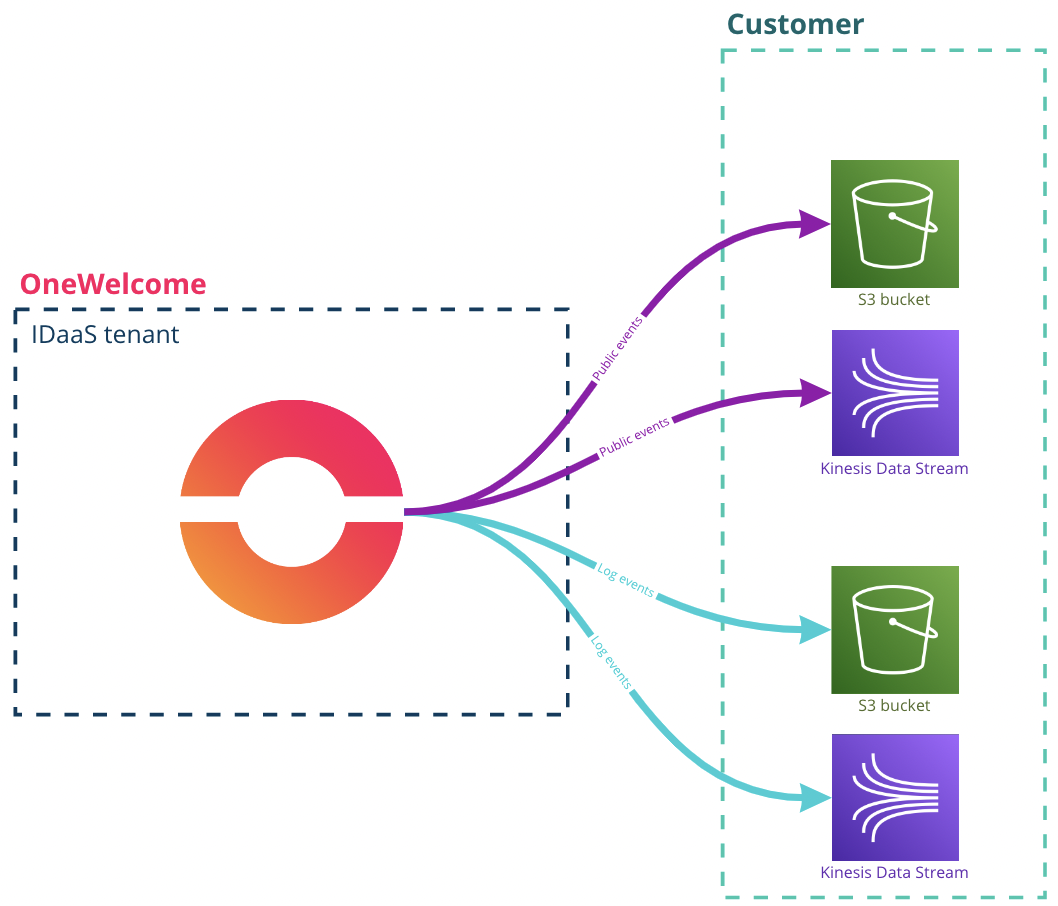
OneWelcome provides 2 ways of consuming both log and public events. Events can be pushed to a Kinesis Data Stream or an S3 bucket. The difference between Kinesis and S3 is that a Kinesis stream is real-time. When an event happens, it is immediately pushed to the Kinesis stream, with very little delay. Events written to an S3 bucket and written in batches, which results in a near-realtime solution.
Every tenant in the OneWelcome IDaaS can be set up to publish events to either S3 or Kinesis. Within one tenant, log and public events can be individually configured. This gives full flexibility to send public and log events to different targets or the same target but different streams or buckets.
Below follow a few of the supported scenarios:
For a single tenant Public events are published to a Kinesis Data Stream and Log events are published to an S3 bucket
For a single tenant Public and Log events are both published to Kinesis, but a separate Data stream is used per event category
For a single tenant Public and Log events are published to the same S3 bucket. Public and Log events are stored in separate folders to simplify consuming them separately.
The same Kinesis Data Stream can be used for multiple tenants. The tenant ID that is part of event metadata needs to be used to distinguish for which tenant an event was sent.
Kinesis Data Stream
Kinesis Data Streams use the concept of a record to indicate a single entry within a Kinesis Data Stream. Our events are wrapped in a JSON object containing an array of 'events' as one Record in a Kinesis Data Stream might contain multiple events! The structure of a Kinesis Record can be found in the AWS documentation. A Kinesis Record contains a data field. In this field the OneWelcome events are placed.
Below follows an example of the data inside a data field in a Kinesis Record:
Furthermore we recommend to follow the AWS documentation on how to consume data from a Kinesis Data Stream.
Setting up the Kinesis Data Stream
This paragraph explains how to set up a Kinesis Data Stream so that OneWelcome can push events to it.
1. Create a Kinesis Data Stream
KMS encryption is optional, but recommended, see step 5 for instructions. We recommend On demand scaling, so capacity doesn’t have to be managed.
2. Create an IAM policy (IAM / Policies / Create policy / JSON)
Use the contents specified in the code block below. Replace the placeholders $aws-region, $aws-account-no and $your-stream-name to resources created and known by you.
**
Create an IAM Role with trust policy (IAM / Roles / Create role / Custom trust policy)
**The contents are specified in the code block below. 185813010098 is the OneWelcome AWS account. The Condition block in this trust policy is optional but recommended. If you provide us a token (a random string), we will be presenting it every time we assume this role, protecting you from someone else pretending to be OneWelcome (confused deputy problem).
4. Attach the policy from point 2 to role from point 3
5. [Optional] Using a KMS key for record encryption
The encryption in transit is enabled by default by AWS. Encryption at rest of particular records can be configured using KMS key. There are two options – AWS managed CMK or Customer-managed CMK.
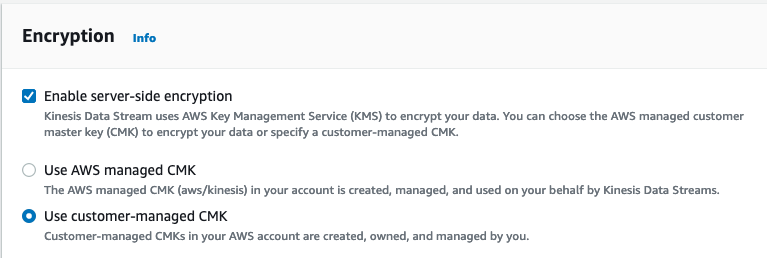
In order to use a c ustomer-managed CMK for encrypting records in a Kinesis Data Stream, you need to allow the “put records” role to use the key in KMS key policy. Go to the KMS console and edit the KMS key policy, add the following:
Replace the **$aws-account-no**and **$kinesis-put-record-role** placeholders with the correct values.
Alternatively, in order to use an AWS managed CMK you just need to enable that option. No additional setup is needed.
6. Share the Stream name and IAM role ARN that you created above with OneWelcome.
S3 Bucket
The data in the S3 Bucket is written by the S3 target of the Kinesis Data Firehose. This solution uses the Amazon S3 Object name format. Which means that records are pushed into the S3 bucket with a UTC time prefix. Additionally, the event category is used as an extra prefix. The total prefix looks as follows:
Kinesis data firehose writes files using the JSON lines format. This means that every file contains multiple JSON value objects separated by a line break.
Below you can see example file contents for a file in a S3 bucket:
Each line contains a JSON value object that contains an events attribute. This attribute contains an array of events.
Below you can see an example single JSON value object taken from the file contents above:
Setting up the S3 bucket
This paragraph explains how to set up an S3 bucket in your AWS account so OneWelcome can push events to it.
Start with creating a KMS key:
Key type: “Symmetric”
Key usage: “Encrypt and decrypt”,
Key material origin: “KMS”, Regionality: doesn’t matter).
Add a KMS key policy statement allowing access to the key from Onewelcome’s AWS account:
The Statement.Principal.AWS[1] role is the Firehose's role ARN that is created by OneWelcome. This value needs to be supplied to you and you must replace the existing value in the snippet above with the real value.
Next, create the S3 bucket with the following bucket policy
The Statement.Principal.AWS role is the Firehose's role ARN that is created by OneWelcome for you. Hence, replace the current value with the value that we provide to you.
The Statement.Resource should reflect the bucket name created and known by you.
Both the KMS key and S3 bucket must reside in the same region.
